Sentiment Analysis of Mahabharata using F#
Learn sentiment analysis of the Mahabharata using F#. Explore NLP techniques applied to history's longest poem with practical code examples.
This article is part of FSAdvent 2016 calendar.
This is my second post of 2016. Sadly, not much writing this year. So I need to cover up with this little long post. So, grab your favorite coffee or tea before getting started.
There is one wonderful coincidence here: both posts of 2016 are based on the Epic Mahabharata. If anyone is interested in poem-like things, do check out my another post.
Epic Mahabharata
Many people have heard of it, but few are lucky enough to get a chance to read it. Even fewer know things in detail about it. As per the global source of truth Wikipedia, it is the "longest poem ever written" in human history. It has around 1.8 million words in total. It is roughly 10 times the length of the Iliad and Odyssey combined.
So, what is there in it? We can say everything. Love stories to stories about war to stories about revenge. Philosophy to military tactics. Policies on tax, rules of espionage, watching over enemies, and how to find the most able people and make them ministers. The theory of karma, which is part of the Gita, which is part of the Mahabharata. Yoga (not to be confused with physical Yoga people do) explained in the Mahabharata, and so are life, death, and life after death. A tale where God does not solve problems for you but guides you to the solution, enables you to face the problems. A story where God is not a forefather but a friend who is always there for you.
A story where even God accepts a curse with due respect given by a mother. A story where the storyteller himself not only narrates the story but is also an integral part of it. A tale that stays the same but the meaning of it keeps changing for every reader. A story which has a spiral of different small stories consisting of further different stories. An infinite source of knowledge, wisdom, and fun.
I could go on and on, but let's come back to F#.
Natural Language Processing
Understanding human language, words, and sentiments is always exciting. Especially using your favorite programming language. Processing old epic books is always fun, as it not only tells about history and mythology but takes you back to your heritage and culture. This part is from my Mentorship program (more details at the end). An article born from homework I got recently.
I don't know the complexity level of it. It totally depends on the reader. But the results are indeed quite good.
Let the Fun Begin
The first thing is to find a source in English (as it is easier to compare with datasets.). Project Gutenberg is a good place to find some license-free text. If you like to code with this article, then get your favorite book from the site, or you can always download it from my project.
That is the whole Mahabharata in four text files. I did some manual work to separate the books from it. You can find them here. There are a total of 18 books (sub-books are not separated).
Let's start with simple File I/O.
    let booknos = [|
                "01";
                "02";
                "03";
                "04";
                "05";
                "06";
                "07";
                "08";
                "09";
                "10";
                "11";
                "12";
                "13";
                "14";
                "15";
                "16";
                "17";
                "18"
                |]

    let trms = booknos.[0] |>  (fun x ->
            Path.Combine(__SOURCE_DIRECTORY__, "..", "books/"+ x + ".txt") |> File.ReadAllLines |> String.concat " "
                    ) |> (fun y -> y.Split ' ')
That's quite a lot of terms for a small piece of code. Now we are one step closer to becoming data scientists.
Let's find the unique terms and frequency of them.
let uniqtrms = trms |> Array.countBy id
See another line and we are done. We are now official data scientists.
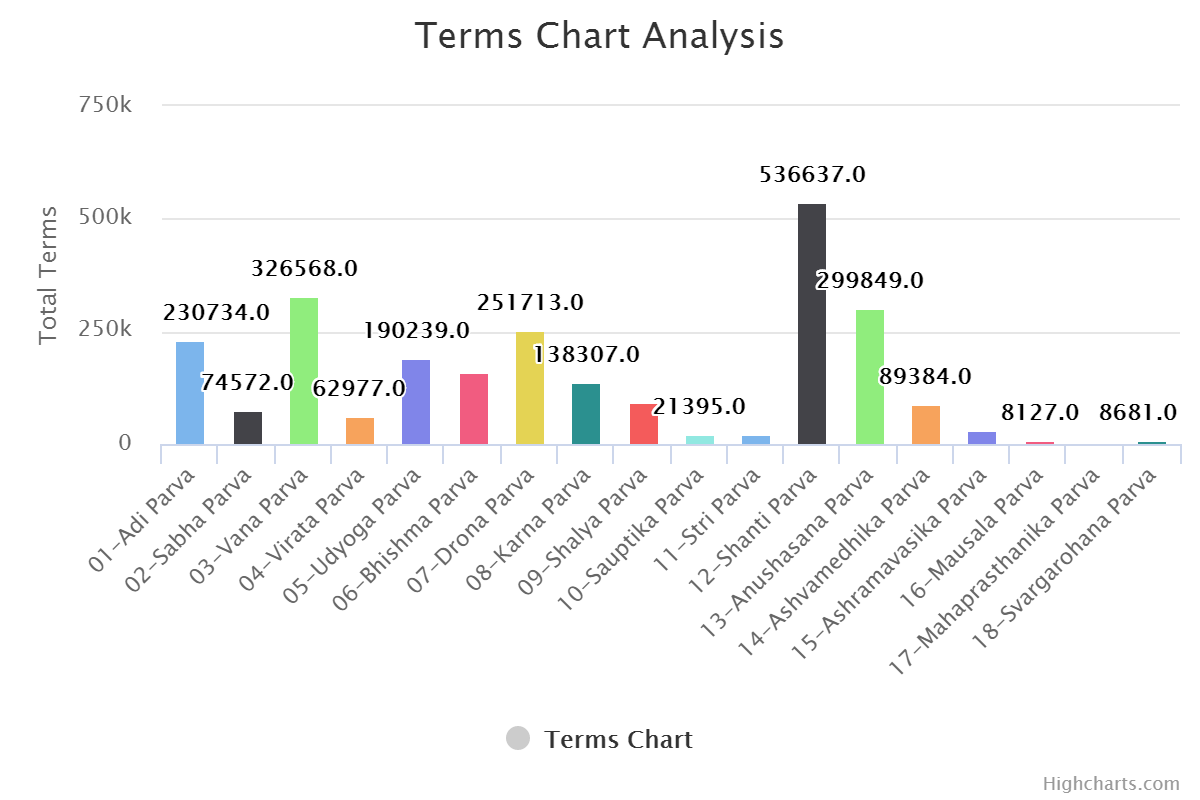
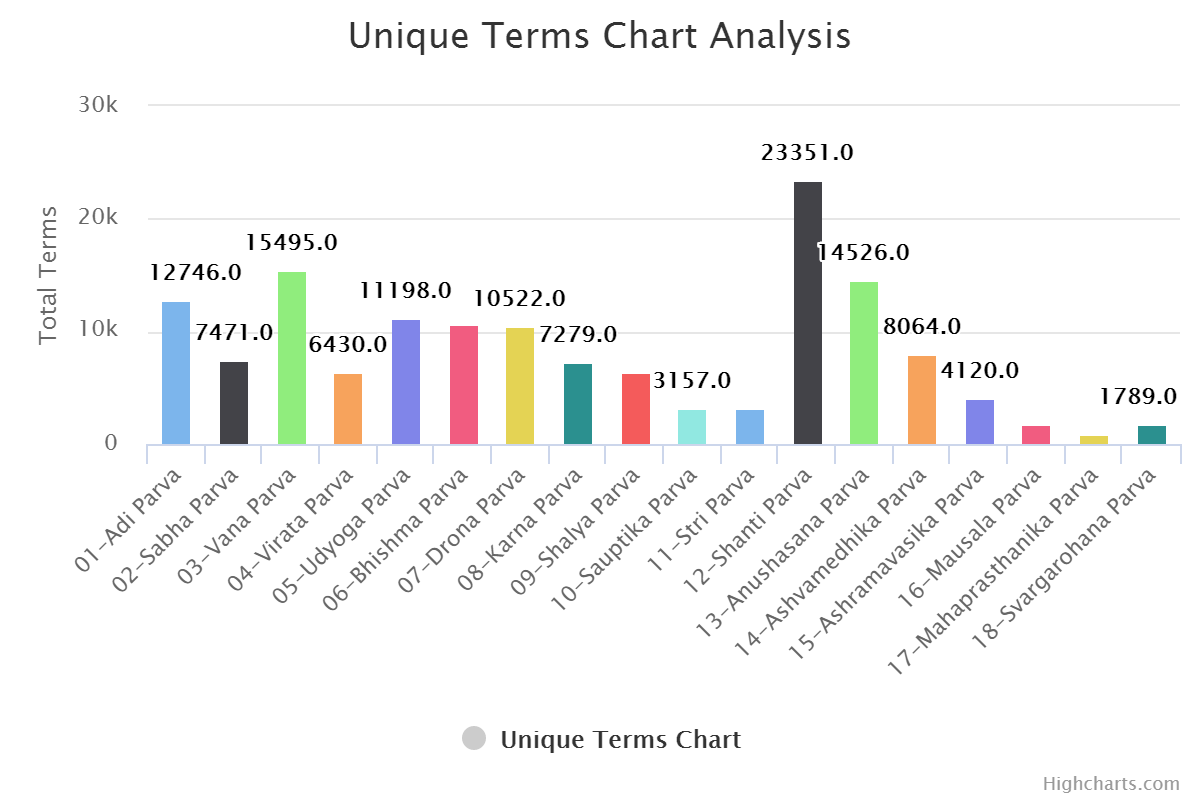
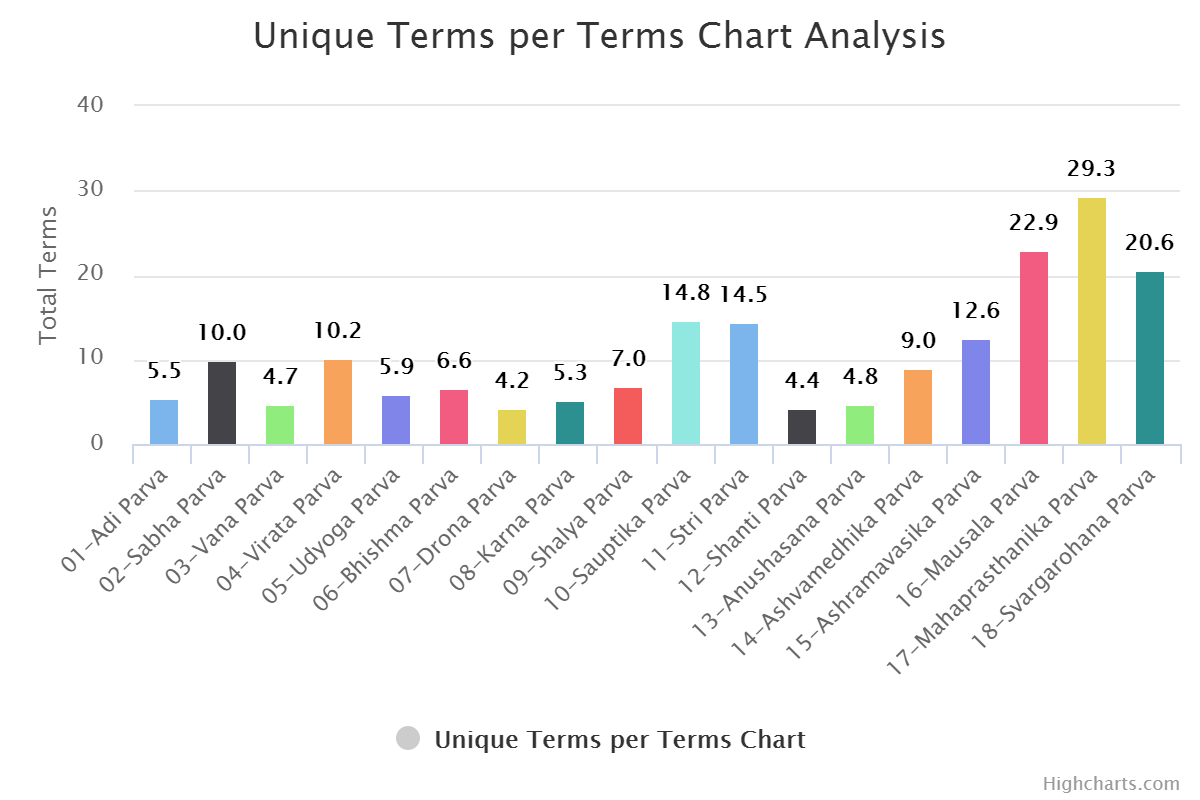
Go ahead and try for other books also. If you are feeling lazy, you can check out results here or see below.
For Terms:
For Unique Terms:
For Unique Terms per Terms:
What's next? Let's do the sentiment analysis of all these books and compare them with each other.
Sentiment Analysis
Whaaat?
Analysis is done to find out the tone of given text. Here we have books. Basically, using this we can find out whether a book is more joyful to read or tilted towards sadness. How many surprise elements the book has. It is useful to understand conversation, if it is more towards the positive end or negative end.
Coding bits
It will make more sense while comparing.
As with everything else in F#, here we also start with a type and start putting things in it. Let's call it the Book type. Why not?
    type SentimentInNumber = {
        Anger:float
        Anticipation:float
        Disgust:float
        Fear:float
        Joy:float
        Negative:float
        Positive:float
        Sadness:float
        Surprise:float
        Trust:float
        Word: string
    }

    type Word = {
        Term :string
        Rating : int
    }


    type Book = {
        Name : string
        Text : string
        UniqueTerms : Set<string>
        Terms : string []
        UniqueTermsWithFrequency : (string * int) []
        SentimentIndex : SentimentInNumber
        WordsRating : Word []
    }
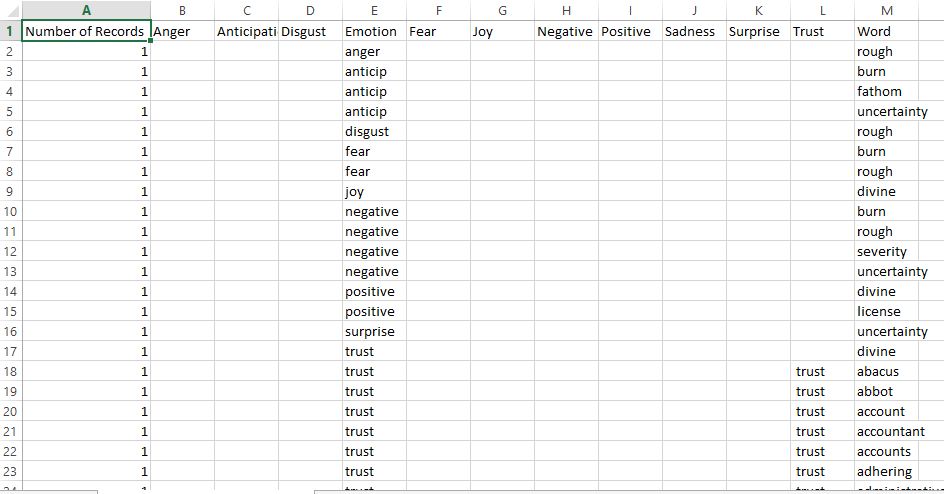
Now, for a second, put this aside. We need more details or data to find out sentiments. Data with which we can compare our book terms. So, we will be using two datasets. For emotions, we will be using this, and for positive and negative ratings, we will be using this.
Here is what they look like.
Emotion Lexicon:
And Word with Ratings:
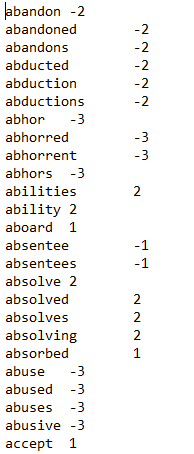
The traditional way to pull data out of a CSV file is for -> for -> for loops. But we are in F# land, so we will be using the CSV Type Provider. Let's pull data out of the CSV and shape it into types.
    let sentimentCSVPath = Path.Combine(__SOURCE_DIRECTORY__, "..","data/Basic_Emotions_(size_is_proportional_to_number_of__data.csv")
    type SentimentCsv = CsvProvider< "../data/Basic_Emotions_(size_is_proportional_to_number_of__data.csv">

    let SentimentData = SentimentCsv.Load("../data/Basic_Emotions_(size_is_proportional_to_number_of__data.csv")

    type SentimentInNumber = {
        Anger:float
        Anticipation:float
        Disgust:float
        Fear:float
        Joy:float
        Negative:float
        Positive:float
        Sadness:float
        Surprise:float
        Trust:float
        Word: string
    }

    let sentimentCalculate (anger,anticipation, disgust,emotion,fear, joy, negative, positive, sadness, surprise, trust, word) =
        let a = {
            Anger = stringToNum anger
            Anticipation = stringToNum anticipation
            Disgust = stringToNum disgust
            Fear = stringToNum fear
            Joy = stringToNum joy
            Negative = stringToNum negative
            Positive = stringToNum positive
            Sadness = stringToNum sadness
            Surprise = stringToNum surprise
            Trust = stringToNum trust
            Word = word
        }

        match emotion with
        | Anger -> if a.Anger = 0. then {a with Anger = 1.} else a
        | Anticipation -> if a.Anticipation = 0. then {a with Anticipation = 1.} else a
        | Disgust -> if a.Disgust = 0. then {a with Disgust = 1. } else a
        | Fear -> if a.Fear = 0. then {a with Fear = 1.} else a
        | Joy -> if a.Joy = 0. then {a with Joy = 1.} else a
        | Negative -> if a.Negative = 0. then {a with Negative = 1.} else a
        | Positive -> if a.Positive = 0. then {a with Positive = 1.} else a
        | Sadness -> if a.Sadness = 0. then {a with Sadness = 1.} else a
        | Surprise -> if a.Surprise = 0. then {a with Surprise = 1.} else a
        | Trust -> if a.Trust = 0. then {a with Trust = 1.} else a
        | _ -> a

    let allSentimentsInNumber =
        SentimentData.Rows
        |> Seq.map (fun row ->
            sentimentCalculate (
                    row.Anger,
                    row.Anticipation,
                    row.Disgust,
                    row.Emotion,
                    row.Fear,
                    row.Joy,
                    row.Negative,
                    row.Positive,
                    row.Sadness,
                    row.Surprise,
                    row.Trust,
                    row.Word
                    ))
    let SentimentWordsSet = allSentimentsInNumber |> Seq.map (fun row -> row.Word) |> set
Here is the thing about this data. The Emotion column also specifies the emotion, not always, but they are there. So, we need them too. That is the reason for the extra calculation we are doing. Here, for every emotion found, we add 1; otherwise, it is 0.
If you can see, I am not comparing with a string but with a concrete F# term. It is because in the data, we have "anticip" for "anticipation". Now, in the future, if we add another dataset to this collection and it has "anticipation," then it will add an extra case for the same result. So, it would be better to encapsulate them. A clean way to do that is using Active patterns.
Here is the missing piece of code.
    //Active Pattern for Sentiments
    let (|Anger|_|) input =
        if input = "anger" then Some Anger else None
    let (|Anticipation|_|) input =
        if input = "anticip" then Some Anticipation else None
    let (|Disgust|_|) input =
        if input = "disgust" then Some Disgust else None
    let (|Fear|_|) input =
        if input = "fear" then Some Fear else None
    let (|Joy|_|) input =
        if input = "joy" then Some Joy else None
    let (|Negative|_|) input =
        if input = "negative" then Some Negative else None
    let (|Positive|_|) input =
        if input = "positive" then Some Positive else None
    let (|Sadness|_|) input =
        if input = "sadness" then Some Sadness else None
    let (|Surprise|_|) input =
        if input = "surprise" then Some Surprise else None
    let (|Trust|_|) input =
        if input = "trust" then Some Trust else None
Since we have more than seven cases, we will be using partial Active Patterns and join them in the match statement.
The same can be done for words with Positive and Negative ratings.
Here is the code for the same.
    type Word = {
        Term :string
        Rating : int
    }

    let WordList =
        Path.Combine(__SOURCE_DIRECTORY__, "..", "data/AFINN/"+ "AFINN-111" + ".txt")
        |> File.ReadAllLines
        |> Array.map (fun x ->
                        x.Split '\t' |> (fun b -> {Term = b.[0]; Rating = System.Int32.Parse b.[1]})
                        )
Great. Now the stage is set to convert books made of terms into books made of numbers. Let's create one for a book, and then we will loop it for our array.
    let create (bookname:string) (booktext :string) =
        let terms = Terms booktext
        let termsCount = terms.Length |> float
        let termsWithFrequency = UniqueTermsWithFrequency terms
        let uniqueTerms = termsWithFrequency |> Array.map (fun (x,_) -> x)

        {
            Name = bookname
            Text = booktext
            UniqueTerms = uniqueTerms |> set
            Terms = terms
            UniqueTermsWithFrequency = termsWithFrequency
            SentimentIndex =
                let commonEmotions = uniqueTerms |> set |> Set.intersect SentimentWordsSet
                let commonEmotionsCount = termsWithFrequency
                                            |> Array.filter(fun (x,_) -> commonEmotions.Contains x)
                                            |> Array.map (fun (_,y) -> y) |> Array.sum |> float
                let commonEmotionsInNumber = allSentimentsInNumber |> Seq.filter (fun x -> commonEmotions.Contains x.Word) |> Seq.toArray
                let r = commonEmotionsInNumber |> Array.fold (SentimentSum bookname) ZeroSentiment

                { r with
                    Anger = (r.Anger/commonEmotionsCount) * 100.
                    Anticipation = (r.Anticipation/commonEmotionsCount) * 100.
                    Disgust =(r.Disgust/commonEmotionsCount) * 100.
                    // Emotion = (r.Emotion)
                    Fear = (r.Fear/commonEmotionsCount) * 100.
                    Joy = (r.Joy/commonEmotionsCount) * 100.
                    Negative = (r.Negative/commonEmotionsCount) * 100.
                    Positive = (r.Positive/commonEmotionsCount) * 100.
                    Sadness = (r.Sadness/commonEmotionsCount) * 100.
                    Surprise = (r.Surprise/commonEmotionsCount) * 100.
                    Trust = (r.Trust/commonEmotionsCount) * 100.
                }
            WordsRating =
                let commonWords =
                    WordList
                    |> Array.map (fun x -> x.Term)
                    |> set
                    |> Set.intersect (uniqueTerms |> set)
                WordList
                |> Array.filter (fun a -> commonWords.Contains a.Term)
        }
A single function and it's done. That's it. What are we doing in that? Creating our Book type.
Terms and Unique Terms were extracted away.
    let Terms (input:string)=
            input
            |> (fun x -> x.Split ' ')
            |> Array.map (removeSpecialChars >> (fun x -> x.Trim()))
            |> Array.filter (fun x -> x <> "")

    let UniqueTermsWithFrequency (input:string[])=
            input
            |> Array.countBy id
The slightly complicated-looking part is where we are trying to find the Sentiment Index for the book. So, the first step is to clean up the word set. That is why we are using unique terms. Not all terms are present in the dataset we have. So, we need to find common terms. Again, no more loops and conditions. They are two sets; we need common terms, so just intersect them. One line without performance overhead. Now find out the Sentiment details for that word, and to get the details for the book, just fold it and sum it. Done.
    let ZeroSentiment = {
        Anger = 0.
        Anticipation = 0.
        Disgust =0.
        Fear = 0.
        Joy = 0.
        Negative = 0.
        Positive = 0.
        Sadness = 0.
        Surprise = 0.
        Trust = 0.
        Word = String.Empty
    }

    let SentimentSum word a b =
        {
            Anger = a.Anger + b.Anger
            Anticipation = a.Anticipation + b.Anticipation
            Disgust = a.Disgust + b.Disgust
            // Emotion = a.Emotion + b.Emotion
            Fear = a.Fear + b.Fear
            Joy = a.Joy + b.Joy
            Negative = a.Negative + b.Negative
            Positive = a.Positive + b.Positive
            Sadness = a.Sadness + b.Sadness
            Surprise = a.Surprise + b.Surprise
            Trust = a.Trust + b.Trust
            Word = word
        }
So, we have all the data in memory. In our case, in FSI or REPL.
As we are official data scientists, we need to see things in graph format. So, first, let's convert things to JSON and write to disk so we can use it.
    module Utility =
        let JsonDropPath name =
            Path.Combine (__SOURCE_DIRECTORY__, "..", "docs/js/" + name + ".json")
        let dataToJSONFile (fileName : string)(data :'a) =
            let path = JsonDropPath fileName
            use writer = new StreamWriter(path)
            let txt = data |> Compact.serialize
            writer.WriteLine (txt)
Here I am using Fsharplu.Json; do check their project story.
Now, once the JSON is ready, we can easily use it to show in a graph using any graph library.
Here I did a little cheating and wrote some dirty JavaScript. A good practice would be to write code in Fable. So I will not show the JavaScript code.
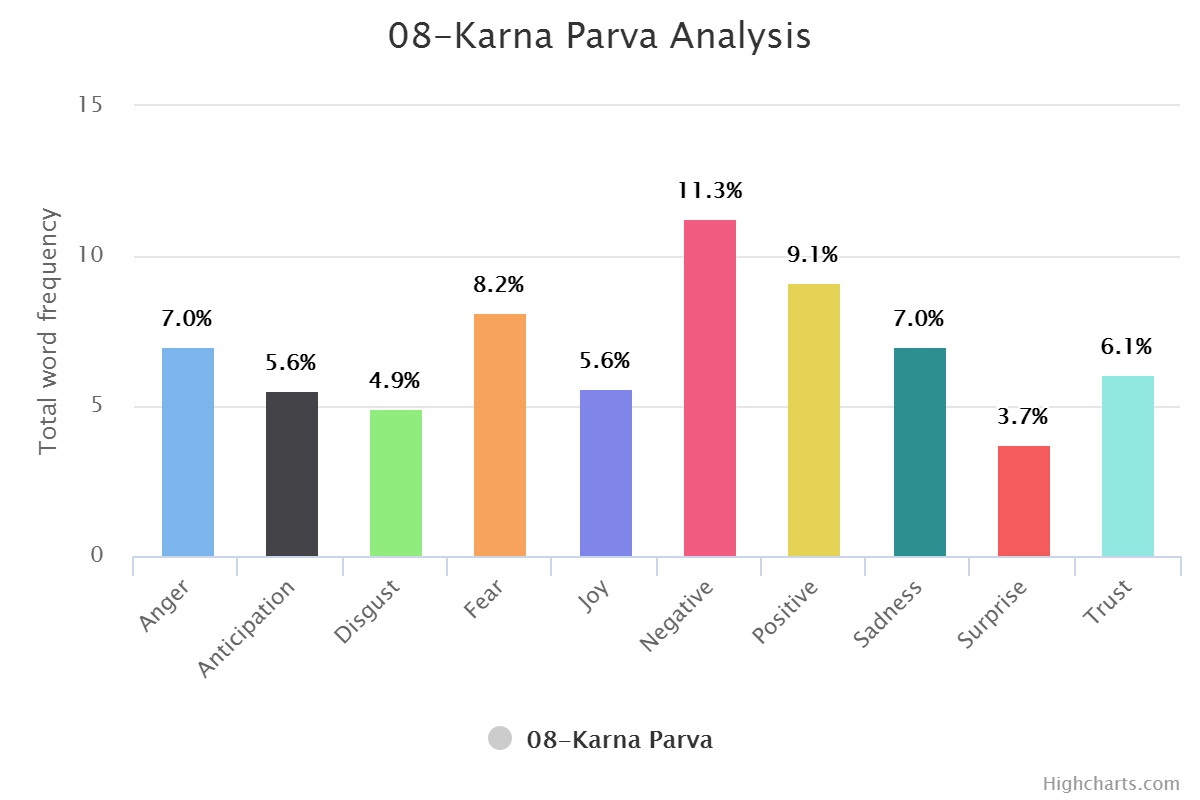
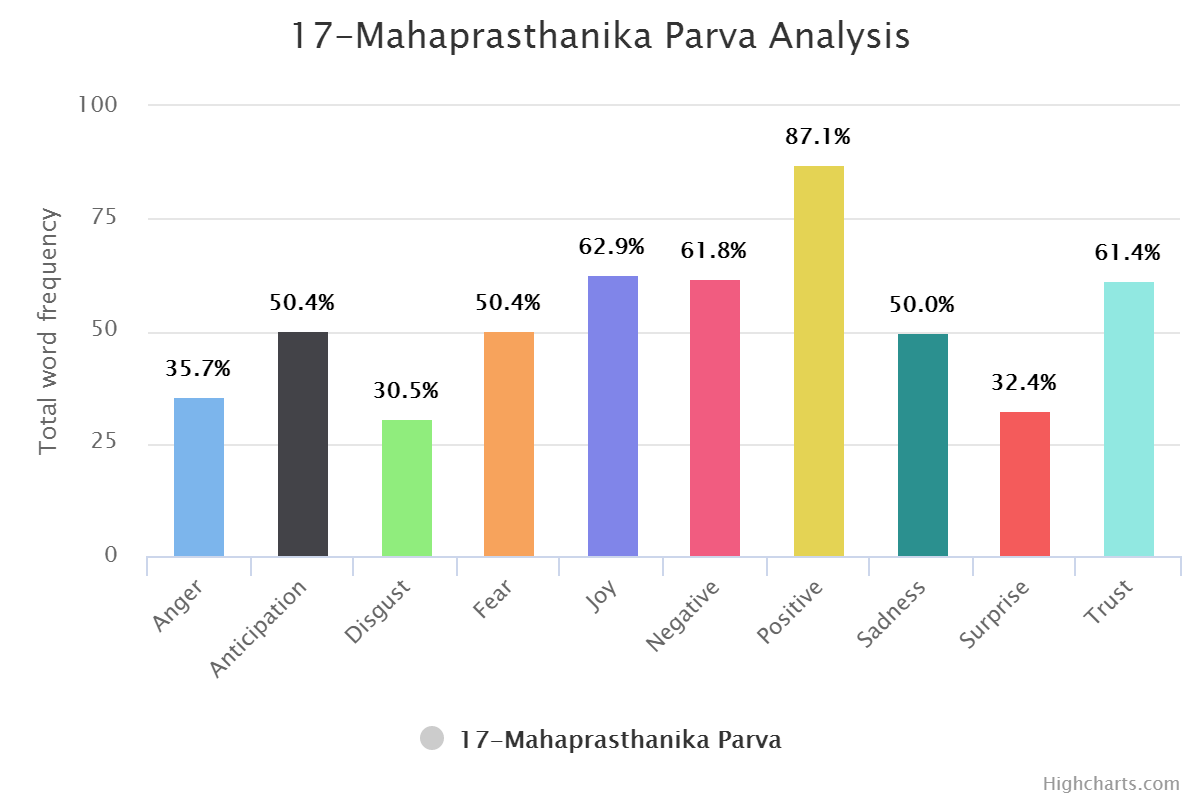
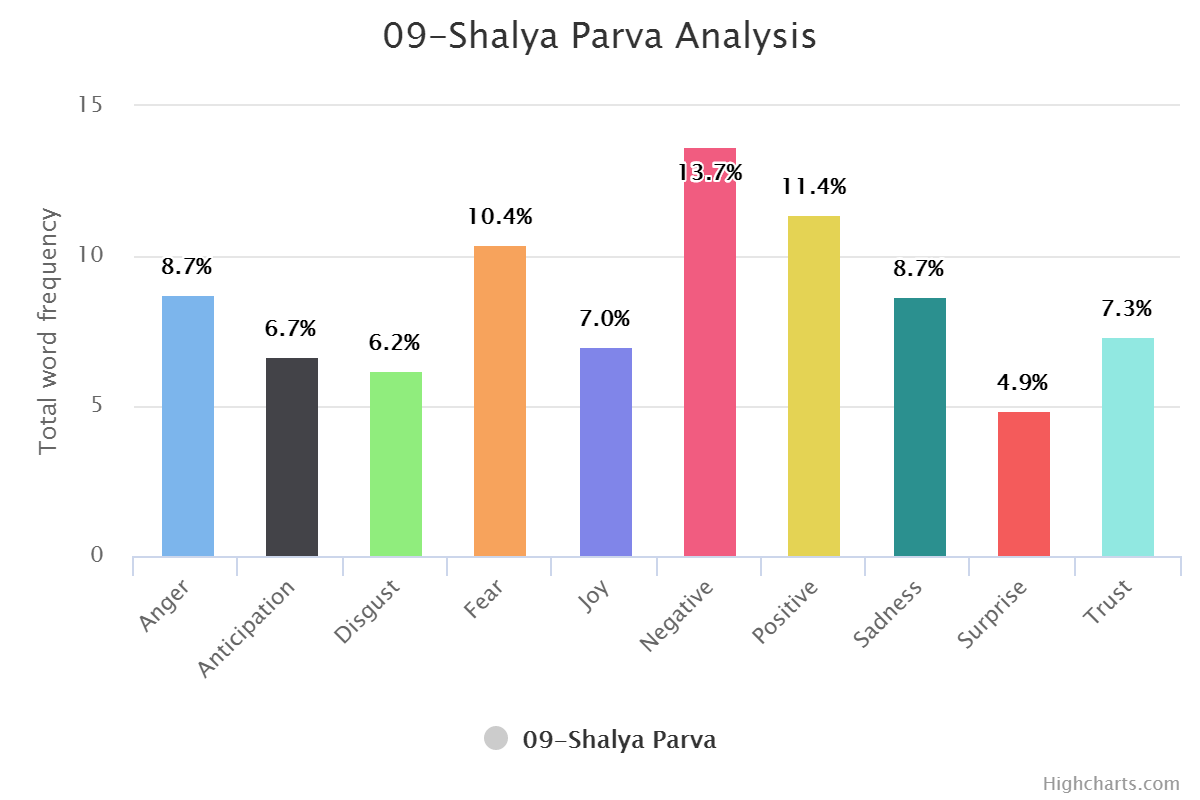
You can find book-wise graphs here and transformed analysis here, which is sentiment-wise. Or check out a few of them below.
Book Wise:
Sentiment Wise:
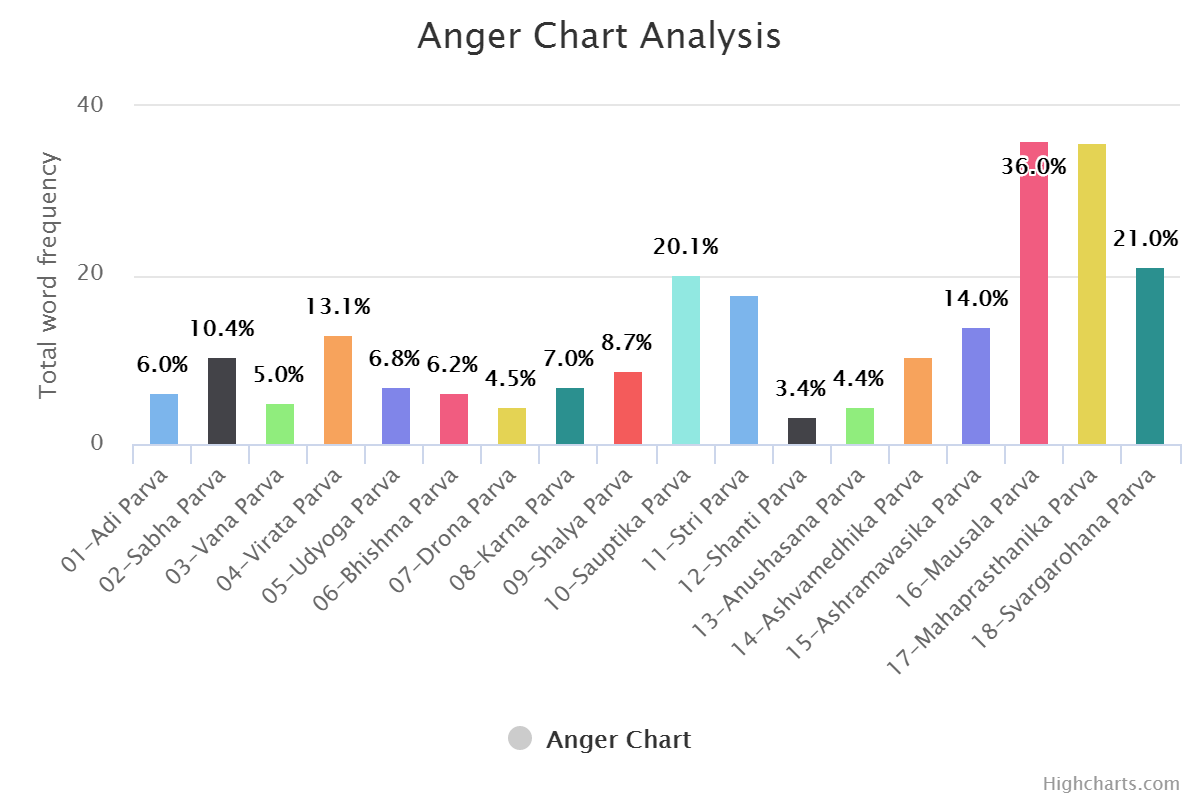
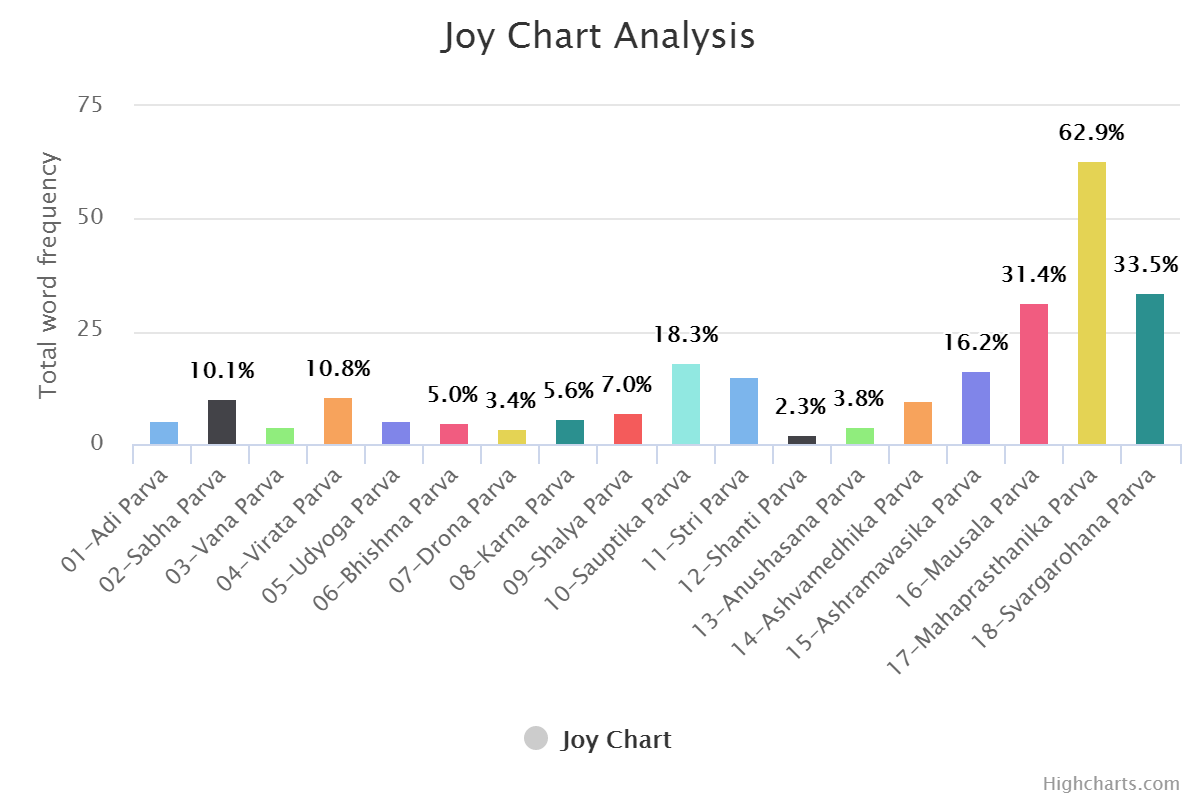
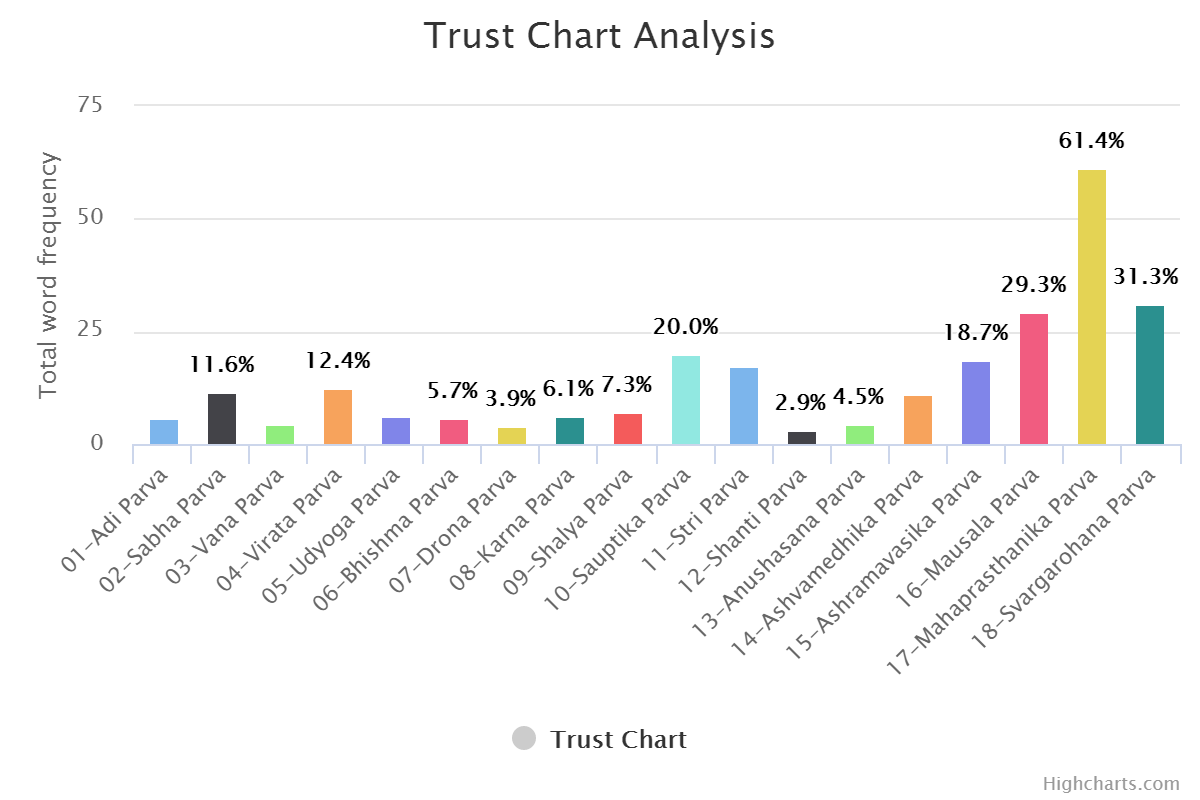
The same can be done for the positive and negative word set. (DIY for you.)
Reading the Graphs & Experience
One thing that needs to be understood here: datasets are created by humans, code is written by humans, and the code is executed by a dumb computer. So there is and always will be a little bit of manual tweaking. As language is a topic with perception, one needs to understand the culture and history of those words from where they are coming. Graphs should be read in that context only. Let me give you an example here.
Check out the word frequency graph here. Pick any graph. Here I am taking three graphs to compare.
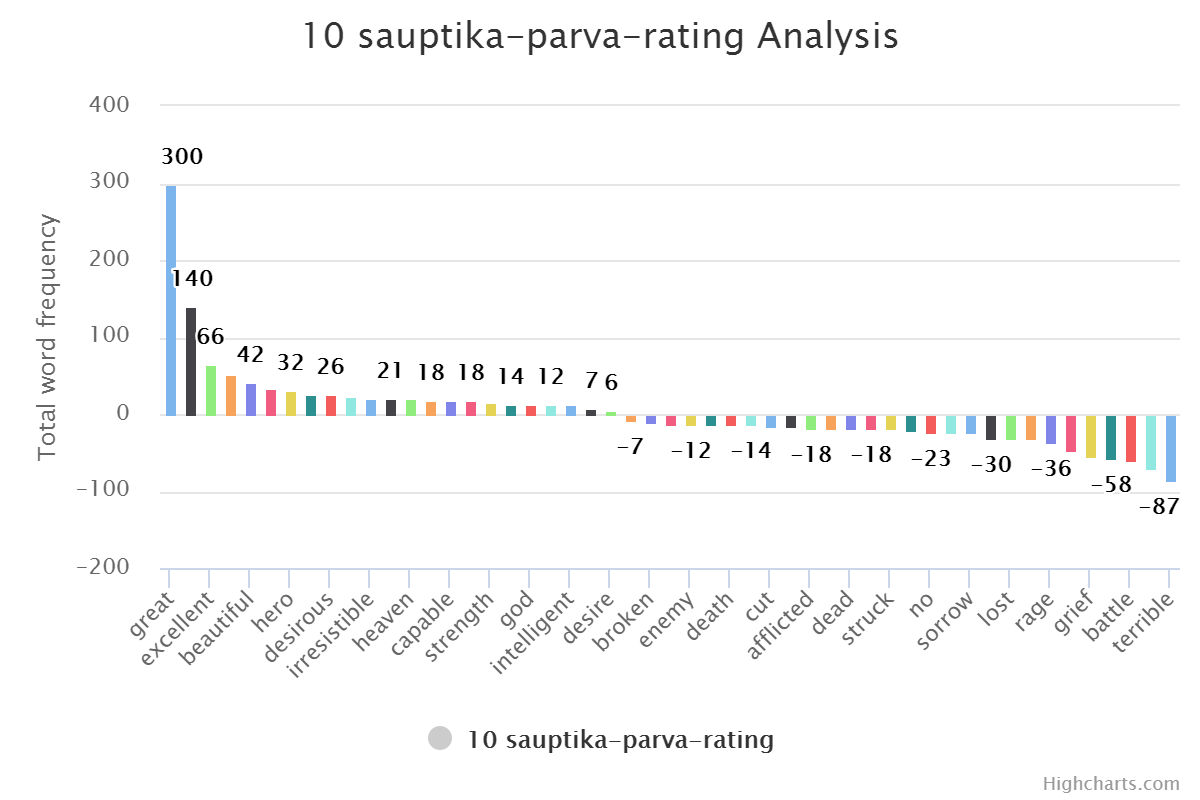
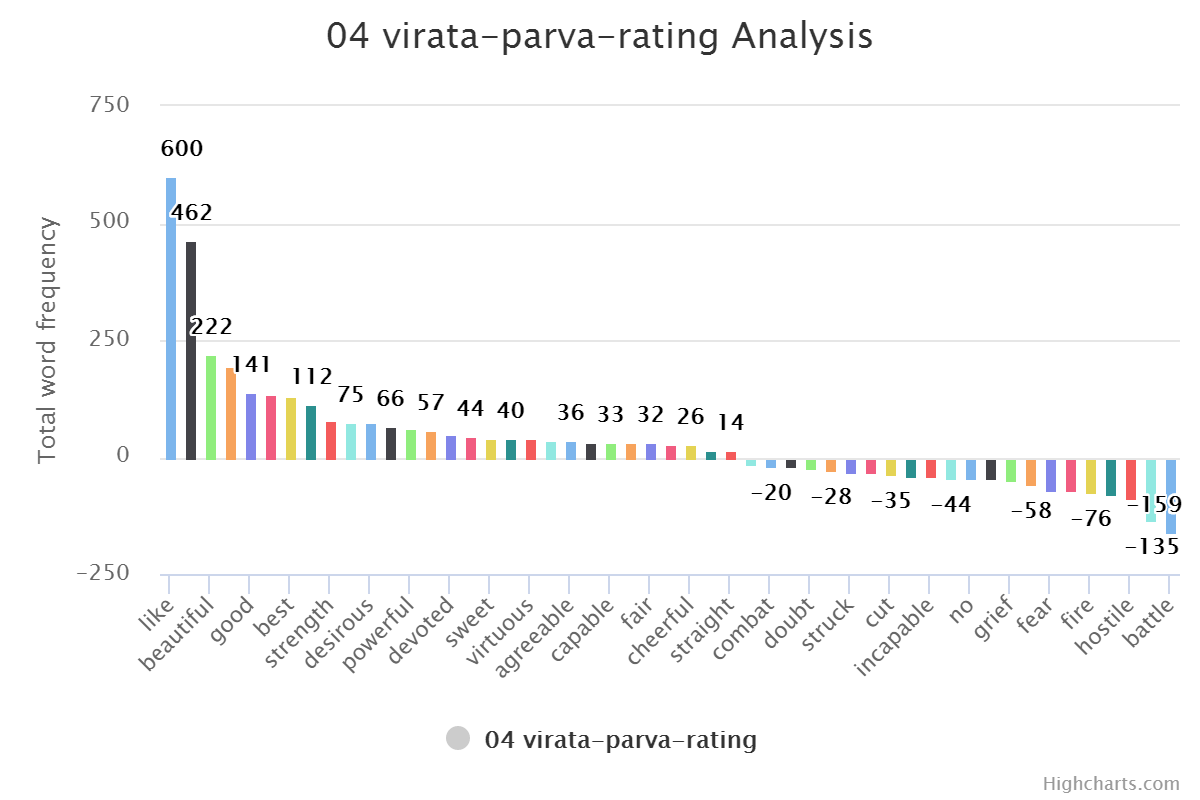

"Great" would always be first. And "Fire" will always come in the last five. In normal Western literature, "Great" is used as an adverb for a person or thing. But in Indian or Mahabharata context, they use it to address someone. Like
Hey, Great warrior Arjuna. A poetic way of saying things. It looks good but also makes the word totally useless in the context of understanding the phrase. This issue can be solved with Inverse Document Frequency, but again that is an extra effort. The same goes for the word "Fire." It has a negative value in normal context, but in this specific context, it is not that negative. Fire God and Fire itself (yagna) are positive. It is very much contextual.
But generating graphs is much more data sciencey to explain.
What's Next
The next step would be doing a more detailed analysis of this Epic. Compare the numbers and analysis with the original context of the books. Try to push the numbers as close as possible to the words. And probably extract some good NLP library from it.
All books are divided into sub-books telling different stories. Wiki links are added in the table list. If you are interested, check them out.
The complete script file for this article is available on GitHub.
Download your favorite books and have fun with graphs.
Thanks Note
Special thanks to people without whom this project may not exist.
Rachel Reese - For organizing this season of the Mentorship program.
Mentorship program: In simple words, it is a program where a Mentor and Mentee are paired with each other. And they have hours per week to teach and learn some topic specific to F#. As highly technical people, things look a little old-school, but the effect that face-to-face interaction can create, nothing else can. No books or recorded videos. Forty-five to sixty minutes can cover more than one can cover in a month or two using digital material. It is always good to have someone there alive in front of you whom you can ask questions. Again, that is all my preference and what I like about this program.
Andrea - For last season's Mentorship program.
My lovely fiancée for not only allowing me but also encouraging me to give extra time to this.
Saheb - To be my phone a friend for any kind of machine learning and data science queries.
Devdutt - My current favorite mythologist. Author of two of my favorite books, Jaya and My Gita, in this genre.
Note to my Mentor
Words cannot explain how grateful I am to have Evelina Gabasova as my mentor, or maybe "guru" would make much more sense in the current context. After a long time, I can have the curiosity and innocence of a kid to ask anything and everything of her. And she is always there with an answer and an ever-smiling face. Always going the extra mile to overcome time zone differences.
In the Mahabharata, Krishna narrates the Gita to Arjuna in the middle of a battlefield, empowering him with eternal knowledge. Just like that,
Hey, Great Evelina, I am no Arjuna, but you have always been my Krishna. Guiding my way through the flood of data. It is always good to have you around. As a mentor and as a friend. Please be there always.
Closing
I like to close with a few of my favorite pictures describing the war moments of the Mahabharata.
Krishna narrating Gita to Arjuna

Krishna driving Arjuna in the war field

Krishna, Arjuna, and Bhisma—three great warriors but helpless in front of time (situation)

Frequently Asked Questions
Sentiment analysis is a Natural Language Processing technique that identifies and analyzes emotions and sentiments in text. Applying it to the Mahabharata allows us to computationally understand the emotional tones throughout this ancient epic, revealing patterns in how characters and situations are portrayed across its 1.8 million words.
The Mahabharata is the longest poem ever written in human history with approximately 1.8 million words—roughly 10 times longer than the combined Iliad and Odyssey. Its vast scope covering love stories, war, philosophy, and spiritual wisdom makes it an excellent dataset for Natural Language Processing and sentiment analysis research.
Project Gutenberg is a reliable source for license-free texts including the Mahabharata in English. Additionally, the author provides a GitHub repository with the text data already prepared for coding along with this article, making it convenient for readers who want to follow along with the tutorial.
This tutorial uses F# (F-Sharp) to perform sentiment analysis on the Mahabharata text. F# is a functional programming language that provides elegant tools for Natural Language Processing and data analysis tasks.
Sentiment analysis can uncover emotional patterns across different sections of the epic, help identify shifts in tone between character interactions, and reveal how sentiments correlate with major events like wars, philosophical discussions, and personal conflicts throughout the narrative.